
Here are the simple instructions on how to combine four pages onto a single page. It’s an easy process and you have the ability to make the page size and the pages you are combining any size you want.
You can also add in images in JPEG and PNG formats, allowing you to mix and match file types to create a single bundle of documents. Combine some pages onto a single page and then use the add pages to PDF tool to insert them into other multi-page documents. Oh, the functionality!
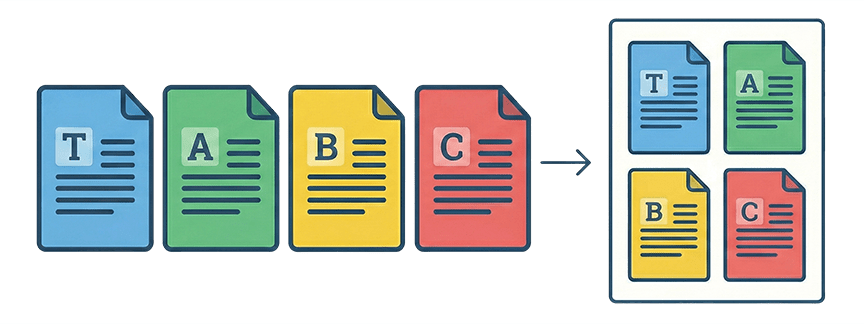
Three Steps to Combine 4 Pages On A Single Page
- Create a Template. A template is how you want the layout of the new page to be. You specify the dimensions of the new page and the dimensions of the pages you are combining on the new page. You can also specify page margins and spacing between the combined pages.
- Upload Pages To The Template. Upload the pages to the template you created. Use the single or bulk merge section; however, note that the single merge section provides a visual preview of the first page.
- Build The New Page. In the merge section select the pages/images you want to use and click the build button. Head to the history section and download your new file.
It’s really that easy. There are just three simple steps; however, there are some settings and options you should be aware of:
- Overage – set to 0
- Slip sheet – no
- Crop marks – yes or no, whatever you need
- Merge style – make sure this is on step and repeat
- Break label – No
- Page numbers – yes or no, whatever you need
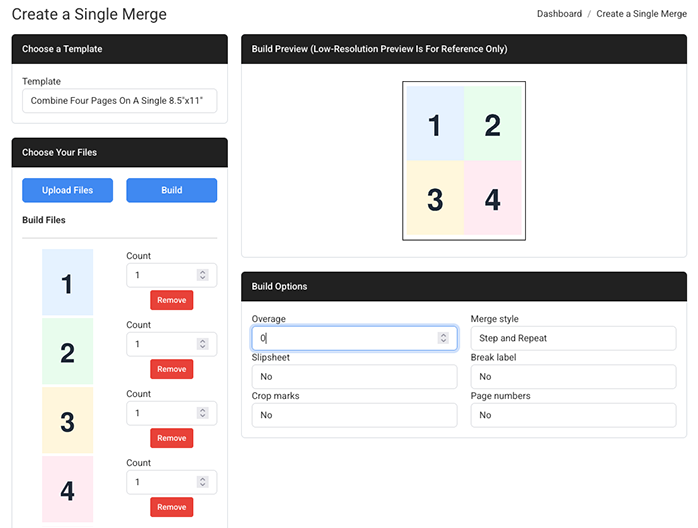
If you want to learn more about these settings read the details on this page.
One last thing. If the pages you want to combine are already part of a multi-page PDF, use the PDF splitter to separate them into individual pages before uploading them to the template.
Combine Four Pages On A Single Page PDF For Free
We have set up a demo page so you can test this out. This will combine four 8.5”x11” pages onto one 8.5”x11” page. The pages are scaled down while maintaining their aspect ratio to fit neatly on the new page.
If you have a paid account, you can create your own templates for any page size to combine any types of reports, forms, images, receipts, logs, notes, you name it onto a single neatly organized page. If you need help email us. We always offer free setup and support!
Frequently Asked Questions
Can I combine different file types, like PDFs and Images? Yes. You can upload PDFs, JPGs, and PNGs to the template. This allows you to mix and match different document types onto a single layout.
Do I need to split a multi-page PDF before combining? Yes. If your source files are already in a multi-page PDF, you must use the PDF Splitter tool first to separate them into individual pages before uploading them to your combined page template.
Can I customize the margins and spacing between pages? Yes. When you create your template (Step 1), you have full control over the page dimensions, margins, and the spacing (gutters) between the combined pages.
Is there a free way to combine 4 pages onto 1? Yes, File Splice offers a free demo page specifically for combining four 8.5×11 pages onto a single sheet so you can test the functionality without a paid account.